6. Add an empty Content Item
TO PRINT THESE INSTRUCTIONS, RIGHT-CLICK IN THIS BOX AND SELECT 'Print'
You should now be in the 'Edit' (NOT Edit Content) view of the new page e.g.
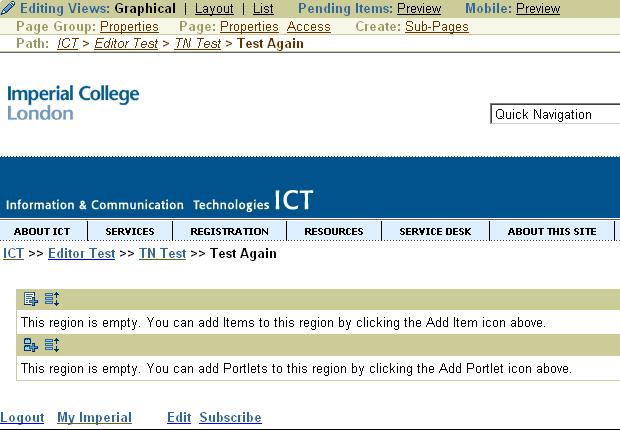
The new page has 2 empty "regions". These are containers for your content.
The regions are:
- The Item region. This is where you add your content items i.e. to hold the information you write or copy. You will normally only need 1 content item, but large amounts of text (over 4 A4 pages) may mean you need to create additional content items.
- The Portlet region. This is where in the future you will be able to pull in bits of programmed code from a library. There are no general-purpose portlets available at the moment, so you should not use this region.
You must add a Content Item to the Item region in order to put any information on to your page.
To add a content item to the Item region:
- Click on the Add Item icon

You will see the Add Item start page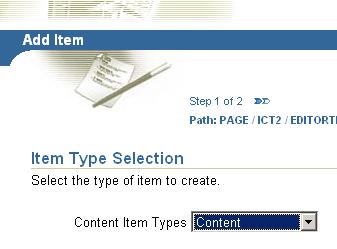
- Check that the Content item type is selected, then click Next >>
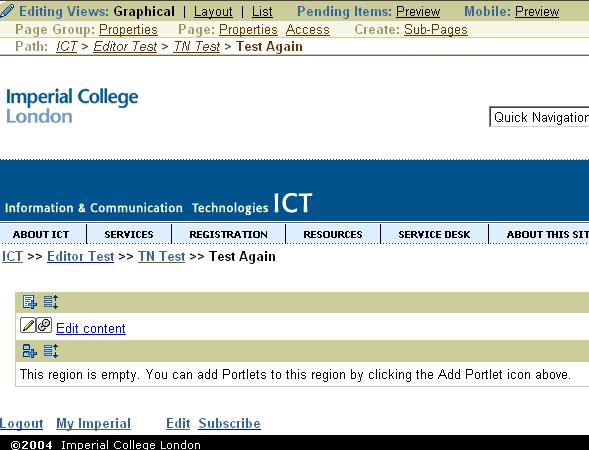
The Item Attributes page is displayed e.g. - The options on this page have not yet been defined for College sites, so you can ignore this section and click on Finish.
- You will see the 'Edit' view of the page with the Content Item added to the Item region, together with a link to 'Edit Content' e.g.