 Display full list
TO PRINT THESE INSTRUCTIONS, RIGHT-CLICK IN THIS BOX AND SELECT 'Print'
1. Click on the Editing Views: | List link top left 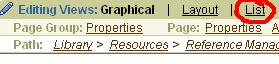
2. You will see the first level of sub-pages for the page you are on. Pages are denoted by the yellow folder symbol  , and Content Items by the content symbol
  .
.
We have not enabled item level security, so YOU CANNOT APPLY PERMISSIONS TO CONTENT ITEMS, ONLY TO PAGES.
3. To display ALL the sub-pages at ALL lower levels, enter % in the Find box:

and click Go (next to the Find box).
4. You will see all the sub pages listed first, followed by all the content items for all those pages. A maximum of 20 items are shown on a page, you can use the arrow symbol to move to the next page.