The tool scans through reading lists uploaded onto Leganto, Imperial’s reading list management platform, then identifies the journal articles using their DOIs. Using this information, it cross-references the authors of these articles with Scopus using an article’s DOI to find the author affiliations. This is what is displayed as the country of origin of the article on a map. The World Bank income levels are used to group the countries and to calculate an overall number of how varied the reading list is by giving a Citation Source Index (CSI). When this number is close to one, it means that a lot of the authors in the reading list have institutional affiliations in high-income countries and if it is close to zero it means the authors of the articles in the reading lists have affiliations in low-income countries.
Frequently asked questions
The Geographic bias tool is an interactive dashboard to help you analyse which parts of the world the research on reading lists comes from. It is designed to help assess the global diversity of the sources that are assigned on reading lists, as well as to identify any sources of unintentional geographical bias. Watch the overview video to learn more:
- Is the research I assign concentrated to a few countries?
- Do students get exposed to knowledge generated in the Global South?
- Are there important voices in a specific area of research that are not being heard?
- Could I include contextually relevant work from diverse geographical regions in my reading list?
It’s important to recognize that when you only look at evidence through a Western lens, you miss a significant part of the world Senior Teaching Fellow Module Lead – School of Public Health
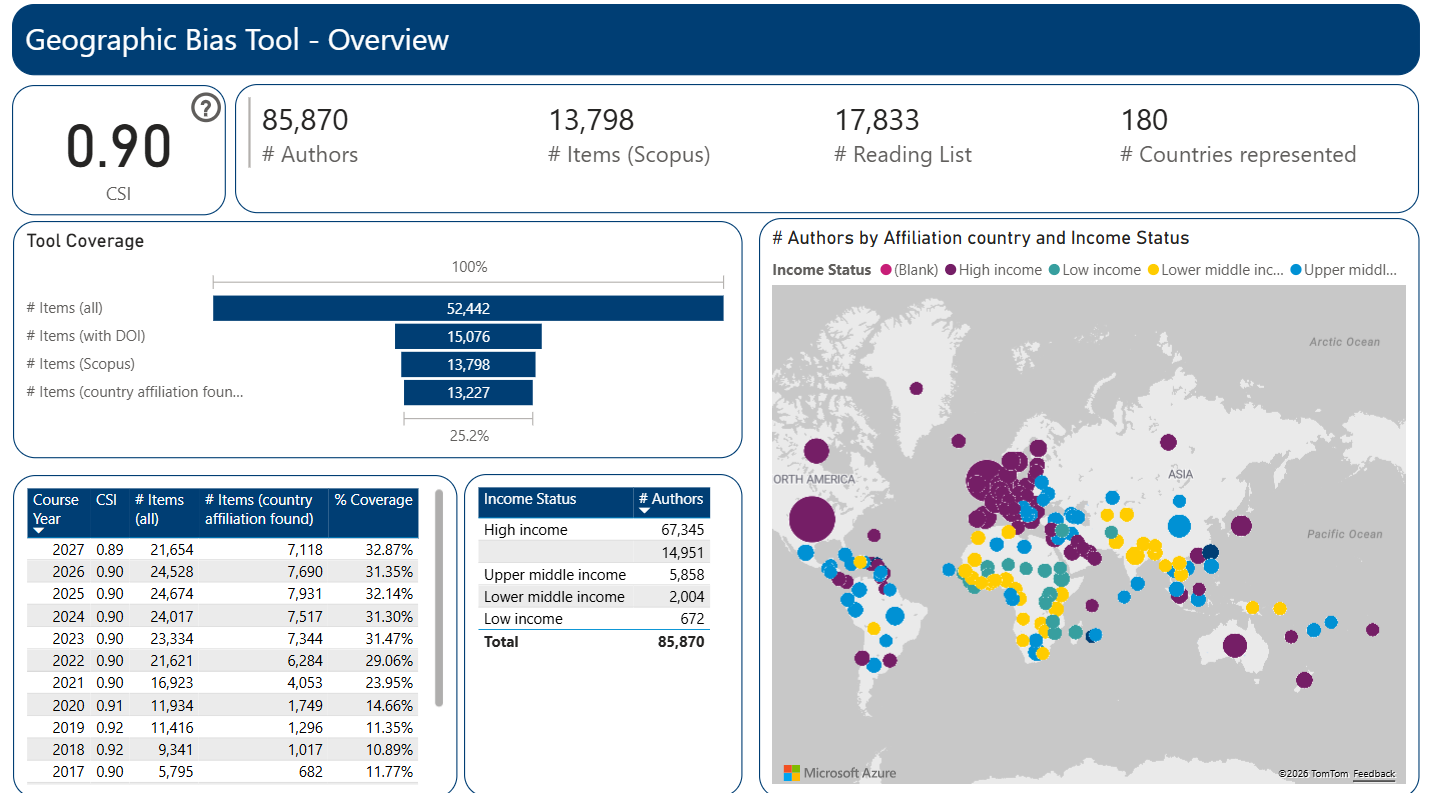
The tool is available to all staff here. Please note you will need to be given permission to access Power BI if you do not already have it. You can also request a consultation meeting if you need assistance navigating the platform and wish to learn more about how to engage in meaningful exploration of your reading list or curriculum using the Power BI platform.
A “lite” version of the tool also exists. This version allows users to input a DOI, or a list of DOIs, rather than obtaining data automatically from Leganto. Article metadata for this version comes from OpenAlex. The lite version is intended for staff or students who may wish to interrogate the geographic distribution of author institutional affiliations of articles they are citing on a research paper or an assessment.