New Imperial website search
As part of the website redesign project, a new T4 search tool was deployed. This page provides guidance on:
- how to exclude/include your pages in search results
- how to improve the search ranking of your pages
- how to request a search promotion.
Excluding your pages from search results
If you have any public (unrestricted) pages that you do not wish to show in search results, then there is now a new option in T4 that you can select from the ‘General’ tab of your pages.
Exclude from ALL search engines – if this option is ticked, then a 'noindex' tag will be added to the page and all search engines, including Google, Bing and the Imperial website search will ignore the page entirely. This means it will not appear in search results.
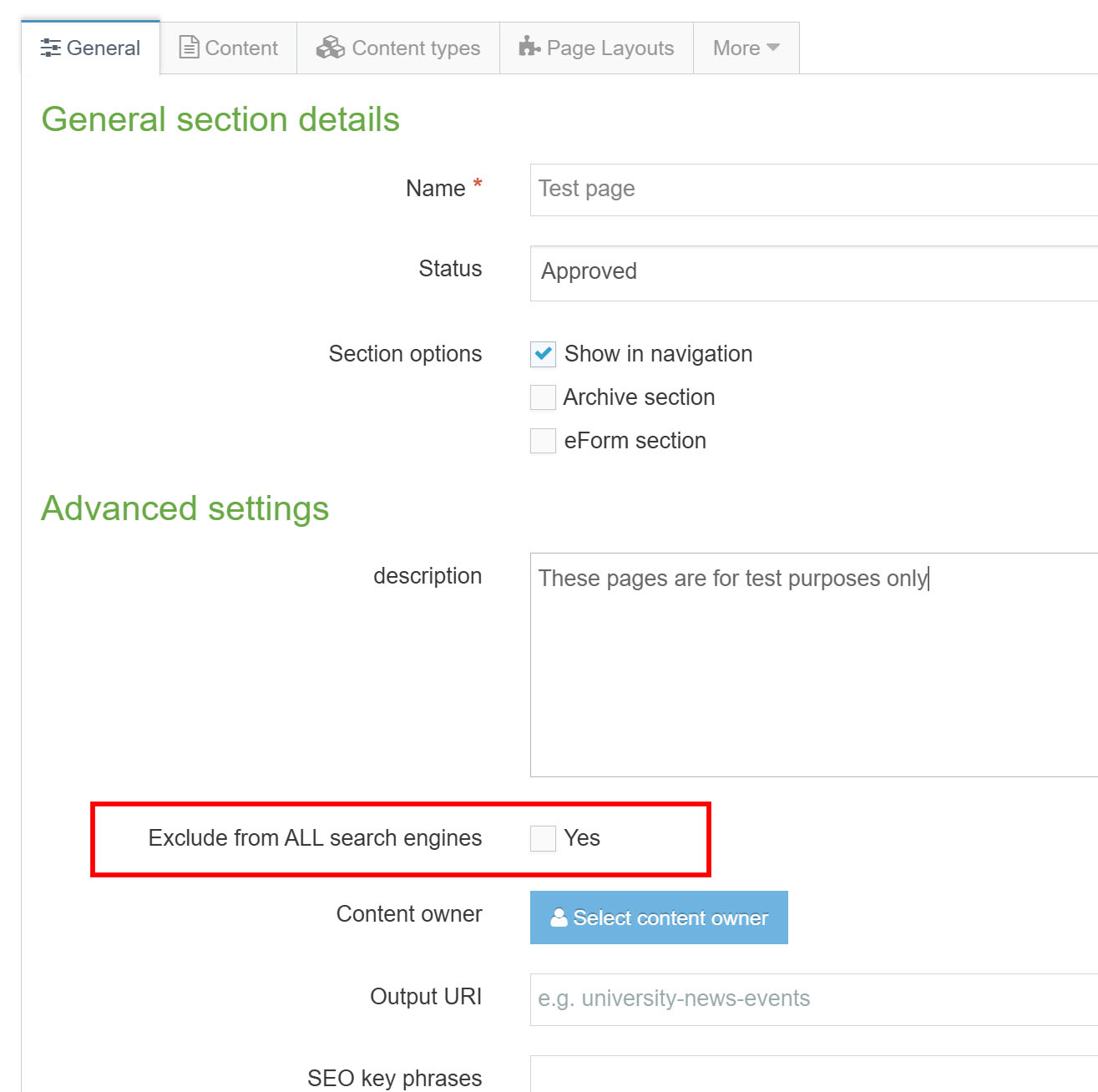
Note: this option needs to be ticked for all pages that you want to exclude from search, child pages do not inherit the setting from the parent page.
Any changes you make to existing pages will take effect overnight for the Imperial website search, but may take 24-48 hours for other search engines e.g. Google.
There are further instructions on editing a section (page).
Note: selecting this option is not a 100% guarantee that they will not appear in search results. If the content on the page is confidential or for an internal audience only, then you should consider restricting access to the page. Read our guidance on restricting viewing access to your T4 web pages.
If you need a page to be removed urgently then you can contact Adam Piccolo or Geoff Day in the Digital team.
What happens if I change my mind and want to include my page in search results again?
You can uncheck the ‘Exclude from ALL search engines’ box and save changes. The change should revert after the overnight sitewide publish and you can expect your page to re-appear in search results after 24-48 hours. You would also need to remove any viewing access restrictions so that search engines can access the page.
Ongoing improvements to search
This search engine has been implemented from the ground up, so it will need time to gather data about search behaviour on the Imperial website to improve the search relevance modelling in order to deliver more relevant search results. The previous Google search had built up many years of search data.
We have been advised by the supplier that this will continually improve as more searches are performed, but we will continue to work with the supplier T4 to improve the search experience on the website.
How you can improve search ranking of your pages
There are a few ways you can improve the ranking of your pages in search. If you know the keywords or phrases that people are searching for, then you should ensure that these are included in the page title, sub headings or the first paragraph. It is also possible to request a promoted search for your page.
Promoted search results
You can request keyword search terms (Promotions) to make it easier to find your web pages. These keyword results appear at the top of the results.
The best keywords anticipate the search terms people might use to find a page. They need to be as subject specific as possible, e.g. Visas and UKVI for the Visas and Immigration page.
If you'd like to discuss your options, please email Adam Piccolo or Geoff Day in the Digital team.