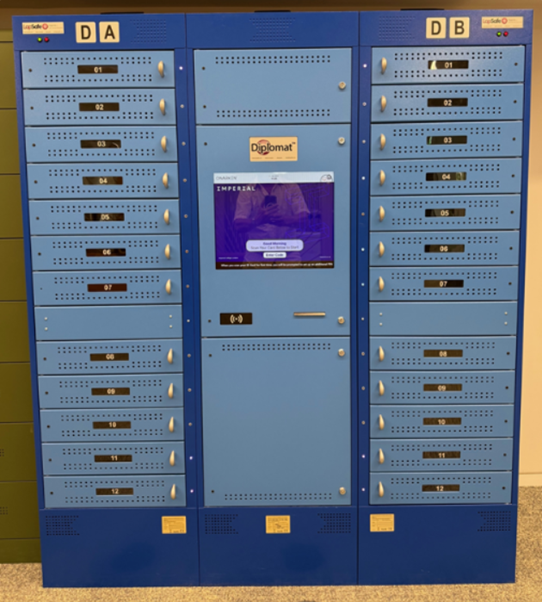
We have a number of Lapsafe lockers dotted across our South Kensington Campus, including one in the Abdus Salam Library, that you can easily loan laptops and other mobile devices from on a temporary basis.
How do the Lapsafes work?
To access a device from the Lapsafe:
- Swipe your Imperial ID card.
- Set up your personal PIN (You set this on first use of the Lapsafe).
- Choose the device you want to borrow and for how long (depending on the departments loaning policies).
- You will receive a notification when it is time to return your Laptop. To return a device, follow the same instructions as above.
Lapsafe FAQs
- Where can I find a Lapsafe?
- Who can use the Lapsafes?
- The laptop/device that I borrowed does not work correctly
- Can I loan more than 1 device?
- Can the Lapsafe be used for other purposes?
- I’d like to know more about the Lapsafe system(s), who can I speak to?
| Dept | Location | Devices | Loan Period(s) | Loan extension possible |
|---|---|---|---|---|
| Business School (1) | Business School - Lower Ground Floor | 24 x Windows laptop | 4 Hours | Confirm with department |
| Business School (2) | ACEX Building - Level 5 (outside Room 555) | 24 x Windows laptop | 4 Hours | Confirm with department |
| Dyson School Engineering | Dyson Building - Level 3 | 24 x Windows laptop & 12 x MacBook Pro | 4 Hours | Confirm with department |
| Electrical Engineering | Electrical Engineering Building - Room 118 | 11 x Apple iPad Mini | 4 Hours | Confirm with department |
| Faculty of Medicine (1) | SAF Building - Foyer (right side) | 24 x Windows laptop | 4 Hours | Not possible |
| Faculty of Medicine (2) | SAF Building - Room G28 | 24 x Windows laptop | 4 Hours | Not possible |
| Faculty of Medicine (3) | SAF Building - Room G28 | 24 x Windows laptop | 4 Hours | Not possible |
| Faculty of Medicine (4) | RCS Building - Level 3 | 24 x Windows laptop | 4 Hours | Not possible |
| Faculty of Medicine (5) | RCS Building - Level 3 | Internal/teaching use only | 4 Hours | NA |
| Abdus Salam Library | Near Issue Desk, Level 1 Abdus Salam Library | 36 x Windows laptops | 4 Hours | Not possible |
| Life Sciences | SAF Building - Foyer (left side) | 60 x Windows laptops | 4 Hours | Confirm with department |
| Mechanical Engineering | City & Guilds Building - Room 359 | 24 x Windows laptop | 1 day | Confirm with department |
| Physics | Blackett Building - Room 319 | 24 x Windows laptop | 7 days | Confirm with department |
| Professional Services | Mediaworks - Level 1 | 12 x Windows laptop & 12 x MacBook Pro | 1 working day | Yes, by contacting the ICT Service Desk |
Access to the Lapsafes is limited to all staff and students from the department that owns the Lapsafe.
The most notable exception to this rule is the Library Lapsafe, which is available to all students.
If the loaned laptop or device is faulty, you can return the device to the Lapsafe, report the fault on the touch screen and take another loan.
No further action is required on your part.
ICT will be notified of the faulty laptop/device and will attempt to fix it based on the description of the fault given. ICT might contact you to establish more details of the fault if necessary.
At present, only one device per user can be loaned at any one time and there are no restrictions on how many times you can loan a device.
The most common use for most Lapsafes at the moment is for temporary loans of laptops and other devices to both staff and students. However, the Lapsafes can be configured for other purposes too.
The below illustrates how the bays could also be configured:
- Loaning - Temporary loan of devices to users.
- Reservations - Reservations allow users to reserve a device for when they arrive at the Lapsafe.
- Bookings - Bookings can be used to pre-book devices for a specific date and time.
- Drop off and Collection - Allows the Lapsafe bays to be used for device drop offs and collections, to and from specified users.
- Hot Lockers - Allows Depts to assign a bay/locker for personal use to a specified user.
These functions are not mutually exclusive either, so you could have one Lapsafe where half of the available bays are for temporary loans and the other half are for drop offs and collections.
The Lapsafes are owned by departments, and ICT manage the laptops and devices inside as well as the underlying Lapsafe System infrastructure.
If you would like to learn a little more about the Lapsafe system in general or if you are thinking about getting one for your department, please contact ICT.
If you have question that is specific to your department’s Lapsafe, please contact the relevant custodian/stakeholder for that particular Lapsafe.
| Department | Contact |
|---|---|
| Business School | Contact your Department Administrator |
| Dyson School of Engineering | Contact your Department Administrator |
| Electrical & Elecctronic Engineering | Contact your Department Administrator |
| Faculty of Medicine | Contact your Department Administrator |
| Abdus Salam Library | Contact your Department Administrator |
| Life Sciences | Contact your Department Administrator |
| Mechanical Engineering | Contact your Department Administrator |
| Physics | Contact your Department Administrator |
| Professional Services - Media Works | Contact your Department Administrator |